
Choosing the right CRM is an important decision for any business. It affects how you manage customers, track sales, handle marketing, and support your teams day to day.
Two of the most popular options in the market are Salesforce and Microsoft Dynamics CRM. Both are powerful platforms used by small businesses, growing companies, and large enterprises across the world.
In this article, we will compare Salesforce and Microsoft Dynamics CRM. We will look at features, pricing approach, ease of use, customization, integrations, and which types of businesses each platform suits best. The goal is to help you understand which one fits your business needs better.
What is Salesforce CRM?
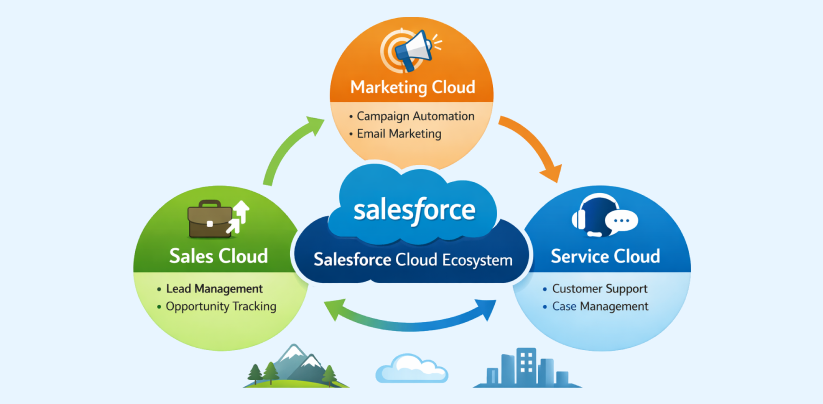
Salesforce CRM is a cloud-based customer relationship management platform designed to help businesses manage sales, marketing, customer service, and data analytics in one place. It is widely used by small businesses, mid-sized companies, and large enterprises because it can scale easily as business needs grow.
Since Salesforce is fully cloud-based, there is no need for on-premise hardware or complex installations. Teams can access it from anywhere with an internet connection, making it ideal for remote and distributed work environments.
Salesforce helps businesses capture and manage leads, track opportunities through the sales pipeline, automate follow-ups, and monitor customer interactions across emails, calls, chats, and support tickets. It also offers powerful reporting and dashboards, giving managers real-time visibility into sales performance and customer behavior.
One of Salesforce’s biggest strengths is customization. Companies can tailor workflows, fields, automations, and apps to match their exact business processes. Through the AppExchange marketplace, businesses can also add thousands of third-party integrations and extensions.
What is Microsoft Dynamics CRM?
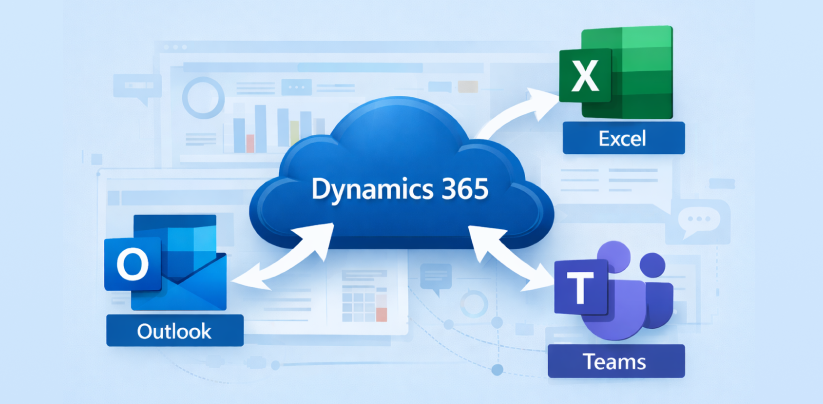
Microsoft Dynamics CRM, now part of Microsoft Dynamics 365, is a customer relationship management solution that combines sales, marketing, customer service, and business operations into a single platform. It is especially popular with organizations already using Microsoft tools and infrastructure.
Dynamics CRM integrates deeply with familiar products like Outlook, Excel, Teams,SharePoint, and Power BI. This makes daily tasks like managing emails, updating customer records, creating reports, and collaborating across teams feel more natural and less disruptive for users.
The platform allows businesses to manage leads and opportunities, track customer interactions, automate sales and service processes, and gain insights through data-driven reports. Because it is part of the broader Dynamics 365 ecosystem, companies can also connect CRM data with finance, supply chain, and operations modules if needed.
Microsoft Dynamics CRM offers both cloud-based and hybrid deployment options, giving businesses more flexibility in how they host and manage their data. It is highly configurable and can be customized to fit industry-specific requirements, especially for companies that rely heavily on Microsoft technologies.
CRM Adoption and Usage
Salesforce Adoption and Usage
Salesforce is one of the most widely adopted CRM platforms globally. It is used by more than 150,000 businesses worldwide, across industries such as retail, finance, healthcare, and technology. [Demand Sage]
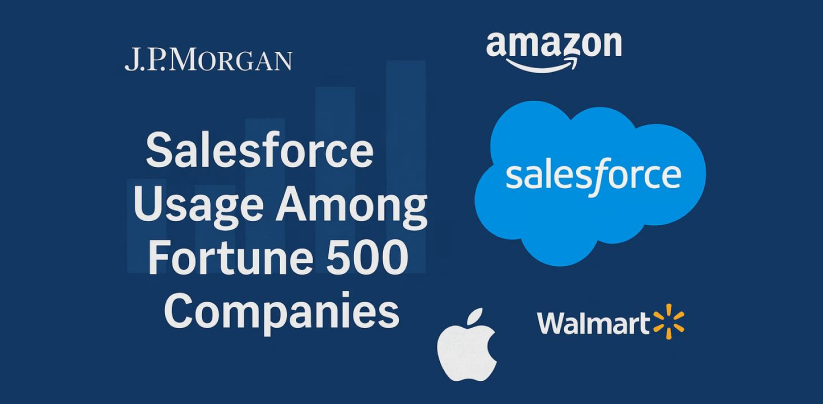
Salesforce is also strongly adopted by large organizations. Reports show that around 90% of Fortune 500 companies use Salesforce in some form for managing sales, customer data, or service operations. [Cirra AI]
The platform’s growth is supported by its cloud-first approach and large ecosystem of third-party apps, which allows businesses to extend Salesforce based on their needs.
Microsoft Dynamics CRM offers both cloud-based and hybrid deployment options, giving businesses more flexibility in how they host and manage their data. It is highly configurable and can be customized to fit industry-specific requirements, especially for companies that rely heavily on Microsoft technologies.
Microsoft Dynamics CRM Adoption and Usage
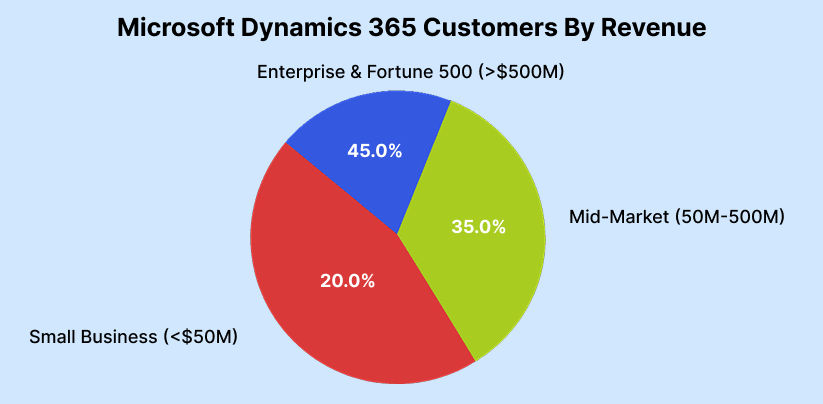
Microsoft Dynamics CRM, part of the Dynamics 365 suite, is widely used by organizations that rely on Microsoft products such as Outlook, Excel, and Teams.
It is used by an estimated 35,000+ companies worldwide across sectors like manufacturing, retail, finance, and healthcare. These users range from small businesses to larger enterprises, showing that Dynamics CRM supports a broad range of company sizes and workflows. [Data Captive]
- Small businesses (under $50M in revenue) – 45% of users: Many small businesses choose Dynamics 365 because it combines CRM and ERP features at a reasonable cost. It helps them manage sales, finances, and daily operations without needing a large IT team.
- Mid-market companies ($50M-$500M in revenue) – 35% of users: Mid-size companies often use Dynamics 365 as they grow. It works well with Microsoft 365 tools and allows them to add more features over time based on their business needs.
- Large enterprises and Fortune 500 companies (over $500M in revenue) – 20% of users: Large organizations use Dynamics 365 across multiple regions to handle complex processes. It supports advanced reporting, automation, and workflows built for large teams and industry-specific needs.
Core CRM Features Comparison
| Core Feature | Salesforce CRM | Microsoft Dynamics CRM |
|---|---|---|
| Lead Management | Strong tools to capture, score, and track leads across the sales funnel | Supports lead capture, tracking, and qualification within sales workflows |
| Opportunity & Deal Tracking | Visual pipelines with detailed stages, forecasting, and deal insights | Sales pipelines with forecasting, deal tracking, and activity history |
| Contact & Account Management | Centralized customer profiles with full interaction history | Centralized contact and account records integrated with Outlook and Excel |
| Workflow & Automation | Advanced automation using flows and process builders | Automation through built-in workflows and Power Automate |
| Customer Support & Case Management | Robust service tools including cases, SLAs, and omni-channel support | Case management with service queues and integration with Teams |
| Marketing Features | Campaign management and marketing automation (via Marketing Cloud or add-ons) | Built-in marketing tools and strong integration with Microsoft marketing solutions |
| Reporting & Analytics | Custom dashboards and reports with real-time insights | Reports and dashboards powered by Power BI |
| App Marketplace & Extensions | AppExchange with thousands of thirdparty apps and integrations | Microsoft AppSource with business apps and extensions |
| Ecosystem Strength | Works across many third-party tools and platforms | Deep integration with Microsoft products like Outlook, Excel, and Teams |
Ease of Use and User Experience
When choosing a CRM, ease of use and user experience play a big role in how quickly teams adopt the system and use it daily.
Salesforce CRM has a modern and clean interface with clear dashboards and customizable screens. Users can quickly see sales numbers, tasks, leads, and customer details in one place. Different teams like sales, marketing, and support can have their own views based on what they need.
Because Salesforce offers many features and customization options, new users may need some training at the beginning. Once the system is set up properly, teams can work faster, automate routine tasks, and manage customer data more efficiently. Salesforce works well for businesses that want flexibility and plan to grow over time.
Microsoft Dynamics CRM is often easier to use for teams already familiar with Microsoft tools. The look and feel are similar to Outlook, Excel, and Teams, which reduces the learning curve. Users can manage emails, contacts, and customer records without switching between many systems.
Navigation in Dynamics CRM feels simple and familiar. Sales teams can update deals, service teams can manage cases, and managers can review reports using tools they already know. This makes adoption quicker, especially for businesses that rely heavily on Microsoft products.
In summary, Salesforce feels like a powerful all-in-one CRM platform designed for customization and growth, while Microsoft Dynamics CRM feels like a natural extension of Microsoft tools, focused on ease of use and quick adoption.
Customization and Flexibility
Customization is important for businesses that want their CRM to match their exact processes instead of changing how they work to fit the software.
Salesforce CRM is widely known for its deep customization options. Businesses can create custom objects, fields, page layouts, and dashboards to fit their sales and service processes. Many workflows and automation rules can be built using visual tools, so heavy coding is often not required. This makes it easier for non-technical teams to automate tasks like follow-ups, approvals, and notifications.
Salesforce also allows businesses to adjust the system as they grow. New processes, departments, or integrations can be added without rebuilding the entire setup. This level of flexibility makes Salesforce a strong choice for companies with complex or changing workflows.
Microsoft Dynamics CRM also offers good customization options, especially when it comes to data structure, forms, and basic workflows. Businesses can customize fields, sales stages, and reports to meet their needs. For standard use cases, these tools work well and are fairly easy to manage.
However, when customization becomes more complex such as advanced automation, custom logic, or deep system integrations Dynamics CRM often requires technical expertise or developer support. This can increase setup time and effort compared to Salesforce’s out-of-the-box tools.
In short, both platforms support customization, but Salesforce generally provides more flexibility without heavy development. If your business has very specific workflows or expects frequent changes, Salesforce usually offers more control right from the start.
Integration Capabilities
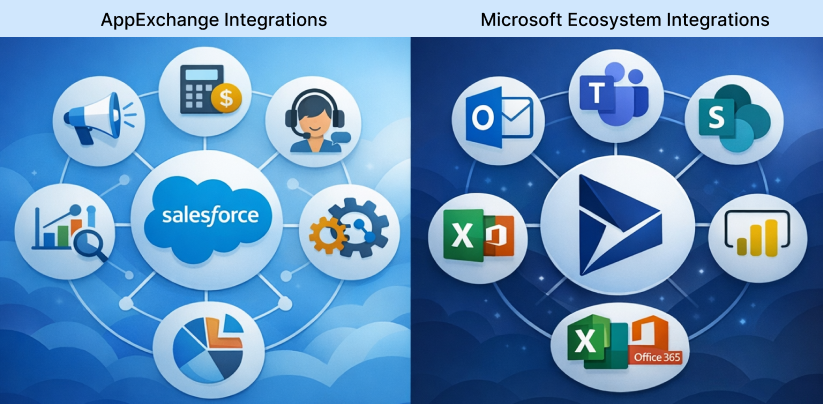
Integration capabilities are important because a CRM rarely works alone. Most businesses use multiple tools for marketing, finance, support, and communication.
Salesforce CRM offers very strong integration options. Through its AppExchange marketplace, Salesforce connects with thousands of third-party tools, including marketing platforms, accounting software, customer support systems, eCommerce tools, and analytics solutions. Many of these integrations are ready to use, which reduces setup time and complexity.
Salesforce also supports custom integrations using APIs, making it easier to connect with in-house systems or industry-specific applications. This flexibility allows businesses to build a connected tech stack where customer data flows smoothly between different tools.
Microsoft Dynamics CRM integrates deeply with Microsoft products such as Outlook, Teams, SharePoint, Excel, and Power BI. This makes collaboration, reporting, and communication easier for teams already working within Microsoft tools. Emails, meetings, documents, and customer records can be managed from a single environment.
Dynamics CRM also supports integration with external systems, but it performs best when most tools are part of the Microsoft ecosystem. Businesses using Microsoft Azure, Power Platform, and other Dynamics 365 apps often benefit from smoother data sharing and easier system management.
Takeaway: Salesforce is ideal for businesses that rely on many third-party tools and need broad integration options. Microsoft Dynamics CRM works best for organizations that are already invested in Microsoft products and want smooth connections across that ecosystem.
Pricing and Licensing Approach
Pricing is an important factor when choosing a CRM, especially as teams grow and feature needs increase.
Salesforce CRM follows a per-user, per-month pricing model. Businesses pay based on the number of users and the edition they choose. Basic plans cover core CRM features, while higher-tier plans include advanced automation, analytics, and customization options. Costs can increase as businesses add more users, premium features, or additional products like Marketing Cloud or Service Cloud.
This pricing structure works well for companies that want a powerful CRM and are comfortable paying more as their usage expands. However, it’s important to plan carefully, as extra add-ons can raise the overall cost over time.
Microsoft Dynamics CRM offers a more flexible licensing approach. Instead of paying for one large package, businesses can select specific apps such as Sales, Customer Service, or Marketing. This allows organizations to pay only for the features they actually need, which can help manage costs more effectively.
Dynamics CRM also provides bundle options within Dynamics 365, which can be costefficient for businesses already using Microsoft tools. This flexibility makes it easier to scale gradually without a big upfront investment.
In summary, the better value depends on your business needs. Salesforce pricing suits companies looking for a full-featured CRM platform with room to grow, while Microsoft Dynamics CRM can be more cost-effective for businesses that want targeted features and already use Microsoft products.
Sales and Marketing Capabilities
Sales and marketing tools are at the heart of any CRM, helping teams attract leads, close deals, and track results.
Salesforce CRM is widely known for its powerful sales features. It offers tools for lead scoring, opportunity management, sales automation, and revenue forecasting. Sales teams can track every stage of the sales pipeline, set reminders, and automate follow-ups to reduce manual work.
On the marketing side, Salesforce supports campaign management, customer segmentation, and performance tracking. With tools like Marketing Cloud and built-in automation, businesses can run email campaigns, nurture leads, and measure engagement across multiple channels. These features make Salesforce a strong choice for companies with active sales and marketing teams.
Microsoft Dynamics CRM also provides solid sales capabilities, including lead and opportunity tracking, pipeline management, and sales forecasting. Its close integration with Outlook and calendar tools makes it easy for sales teams to manage emails, meetings, and customer interactions from one place.
Marketing features are available within Dynamics 365, but some advanced marketing automation tools may require add-ons or separate apps. For businesses running basic to moderate marketing campaigns, Dynamics CRM works well, especially when combined with other Microsoft tools.
Takeaway: Both platforms support sales and marketing automation. However, Salesforce often feels more mature and feature-rich in this area, while Microsoft Dynamics CRM offers a practical and well-integrated solution for teams already using Microsoft products.
Customer Support and Service Tools
Customer support and service tools help businesses respond faster, resolve issues efficiently, and improve customer satisfaction.
Salesforce Service Cloud offers a wide range of customer support features. It includes ticket and case management, live chat, email support, and self-service customer portals. Businesses can create knowledge bases where customers find answers on their own, reducing support workload.
Salesforce also provides AI-assisted tools that help agents prioritize cases, suggest responses, and speed up issue resolution. These features make Service Cloud suitable for both small support teams and large customer service centers handling high volumes of requests.
Microsoft Dynamics CRM also delivers strong customer service capabilities through Dynamics 365 Customer Service. It supports case management, service queues, omnichannel communication (email, chat, and voice), and shared knowledge bases. Agents can collaborate using Microsoft Teams, which improves internal communication and faster problem-solving.
Dynamics CRM works well for businesses that want structured support processes and close integration with Microsoft tools. It can handle basic customer support needs as well as more complex service operations.
In short, both Salesforce and Microsoft Dynamics CRM are capable of supporting customer service for small teams and large enterprises. Salesforce stands out with advanced AI driven features, while Microsoft Dynamics CRM offers a well-integrated and reliable service experience within the Microsoft ecosystem.
Reporting and Analytics
Reporting and analytics help businesses understand performance, track progress, and make better decisions using data.
Salesforce CRM provides customizable dashboards and reports that update in real time. Users can easily track sales performance, pipeline health, customer activity, and team productivity. Dashboards can be tailored for different roles, such as sales reps, managers, or executives, so everyone sees the data that matters to them.
Salesforce reporting is easy to use, even for non-technical users. Reports can be created with simple filters and charts, making it quick to get insights without deep data knowledge. This makes Salesforce a good option for teams that want fast and simple reporting.
Microsoft Dynamics CRM uses Power BI for reporting and analytics, which is a powerful tool for deep data analysis and advanced visualizations. With Power BI, businesses can combine CRM data with information from other systems to create detailed reports and interactive dashboards.
Power BI is especially useful for data-focused teams, but it may take more time to learn for users who are new to it. However, for organizations already using Power BI, Dynamics CRM reporting feels familiar and highly flexible.
In summary, Salesforce is easier to get started with for everyday reporting and real-time dashboards. Microsoft Dynamics CRM is ideal for businesses that need advanced analytics and already use Power BI for data analysis.
Security and Compliance
Security and compliance are critical when handling customer data, especially for growing businesses and large enterprises.
Salesforce CRM follows strong security standards to protect customer information. It supports role-based access control, which means users only see data relevant to their role. Data is encrypted both while it is stored and when it is being transferred. Salesforce also complies with major global regulations and industry standards, making it suitable for regulated industries.
Salesforce regularly updates its platform with security enhancements and monitoring tools, helping businesses stay protected against data threats.
Microsoft Dynamics CRM also provides a high level of security and compliance. It includes role-based access, data encryption, and security policies aligned with Microsoft’s enterprise-grade standards. Since Dynamics CRM is part of the Microsoft ecosystem, it benefits from Microsoft’s global security infrastructure and compliance certifications.
Dynamics CRM supports many regulatory requirements and is widely used by organizations that must meet strict compliance rules.
In summary, both Salesforce and Microsoft Dynamics CRM offer strong security and compliance features. Large enterprises and regulated industries successfully use both platforms, so security is usually not the deciding factor when choosing between them.
Scalability for Business Growth
Scalability is important because a CRM should grow with your business without requiringa full replacement later.
Salesforce CRM is built to scale from small teams to large global enterprises. Businesses can start with basic CRM features and gradually add more users, automation, integrations, and advanced tools as their needs grow. Salesforce supports multiple teams, regions, and complex processes, making it suitable for fast-growing and international companies.
Because Salesforce is cloud-based, performance and updates are handled automatically, allowing businesses to focus on growth rather than system maintenance.
Microsoft Dynamics CRM also scales well, especially for businesses already using Microsoft products. As companies grow, they can add more Dynamics 365 apps, users, and advanced features. Integration with Microsoft tools like Azure and Power Platform helps support larger data volumes and more complex operations.
Dynamics CRM is a strong choice for organizations planning long-term growth within the Microsoft ecosystem.
In summary, both Salesforce and Microsoft Dynamics CRM support long-term business growth. When implemented correctly, either platform can scale effectively as your business expands.
Implementation and Learning Curve
The success of a CRM depends not just on the software, but on how well it is implemented and adopted by the team.
Salesforce CRM usually requires proper planning, configuration, and user training during implementation. Because Salesforce offers many customization and automation options, businesses often work with certified partners to set up workflows, dashboards, and integrations correctly. The learning curve can be moderate at the beginning, but once users understand the system, daily tasks become efficient and well structured.
Good training and a clear rollout plan are important to get the most value from Salesforce.
Microsoft Dynamics CRM can feel easier to use at first, especially for teams already familiar with Microsoft tools like Outlook and Excel. Basic setup and everyday tasks are often quicker to learn. However, when the implementation becomes more complex such as advanced automation, integrations, or custom logic expert support is usually required.
Dynamics CRM also benefits from proper planning and training to ensure smooth adoption.
In summary, the success of both Salesforce and Microsoft Dynamics CRM depends more on the quality of implementation than the platform itself. With the right setup, training, and support, either system can deliver strong results.
Which CRM Is Better for Small Businesses or Startups?
Small businesses and startups usually look for a CRM that is easy to use, affordable, and quick to set up.
Microsoft Dynamics CRM is often a good fit for small businesses that already use Microsoft tools like Outlook, Excel, and Teams. The familiar interface helps teams start using the CRM with minimal training. Flexible licensing also allows startups to choose only the features they need, which can help control costs in the early stages.
For businesses that want basic sales and customer management without heavy customization, Dynamics CRM can be a practical choice.
Salesforce CRM can also work well for small businesses, especially those planning rapid growth. It offers strong features, automation, and flexibility from the start. However, setup, customization, and licensing costs may feel heavier for startups without clear planning or dedicated support.
Salesforce is often better suited for small businesses that expect to scale quickly and want a CRM that can grow with them.
In summary, Microsoft Dynamics CRM is usually better for small businesses that want simplicity and familiarity. Salesforce is a strong option for startups that are growth-focused and ready to invest in a more powerful CRM platform.
Which CRM Works Better for Mid-Size Companies?
Mid-size companies often need a CRM that balances flexibility, integrations, and room to grow without becoming too complex.
Salesforce CRM works very well for mid-size businesses that need flexible workflows and strong integration options. It allows companies to customize sales, marketing, and service processes as they become more structured. With access to thousands of third-party tools through AppExchange, Salesforce makes it easy to connect marketing platforms, accounting software, and customer support systems.
Salesforce is a good choice for mid-size companies that are expanding teams, adding new processes, or working with multiple tools.
Microsoft Dynamics CRM is a strong option for mid-size businesses that rely heavily on Microsoft products. Its tight integration with Outlook, Teams, Excel, SharePoint, and Power BI helps teams work more efficiently with less system switching. Data flows smoothly between tools, improving collaboration and reporting.
Dynamics CRM is especially useful for organizations that want better internal tool connections and prefer to stay within the Microsoft ecosystem.
In summary, Salesforce is often better for mid-size companies that need flexibility and broad integrations, while Microsoft Dynamics CRM suits businesses that want deep integration with Microsoft tools and a familiar working environment.
Which CRM Fits Large Enterprises?
Large enterprises need a CRM that can handle complex processes, large data volumes, and multiple teams across regions.
Salesforce CRM is often chosen by large enterprises with complex sales cycles and high customer data needs. It supports advanced automation, detailed reporting, and highly customized workflows across departments and locations. Salesforce can manage large numbers of users and records while maintaining performance, which makes it suitable for global organizations.
Many enterprises also choose Salesforce because of its wide integration options and ability to adapt to different business models.
Microsoft Dynamics CRM also works well for large enterprises, especially those deeply invested in Microsoft infrastructure. Companies using Microsoft Azure, Power Platform, and Dynamics 365 apps benefit from tight system integration and centralized data management. This helps enterprises align CRM with finance, operations, and analytics.
Dynamics CRM is a strong option for organizations that want a unified Microsoft-based environment across departments.
In summary, both Salesforce and Microsoft Dynamics CRM fit large enterprises. Salesforce is often preferred for complex sales and customer management needs, while Microsoft Dynamics CRM works best for enterprises that rely heavily on Microsoft infrastructure.
Final Comparison Summary
Salesforce CRM is known for its strong customization options, large app ecosystem, and advanced sales tools. It works well for businesses that need flexible workflows, powerful automation, and the ability to connect with many third-party applications. Salesforce is often chosen by companies planning long-term growth or managing complex sales processes.
Microsoft Dynamics CRM stands out for its smooth integration with Microsoft tools like Outlook, Teams, Excel, and Power BI. It offers flexible licensing options and a familiar user experience, especially for teams already using Microsoft products. This makes it easier to adopt and manage without heavy retraining.
In the end, there is no one-size-fits-all answer. The right CRM depends on your business size, the tools you already use, your budget, and your long-term goals. Choosing the platform that fits your existing ecosystem and future plans will deliver the best results.
Conclusion
Salesforce and Microsoft Dynamics CRM are both reliable, widely used CRM platforms. Each has its own strengths and works best in different business environments.
The key is understanding your workflows, team habits, and future plans before choosing.
At Brevity Software Solutions, we help businesses evaluate, implement, and customize CRM platforms based on real business needs, not just features.
Need any help deciding or setting up the right CRM? Book a free consultation call with our team!